


QuickBooks vs. Restaurant Accounting Software | KYN
 Sep 26,2026
QuickBooks vs. Restaurant-Specific Accounting Software: What’s the Real Difference?
A straight comparison of QuickBooks, restaurant accounting software, and the performance layer most operators are missing.
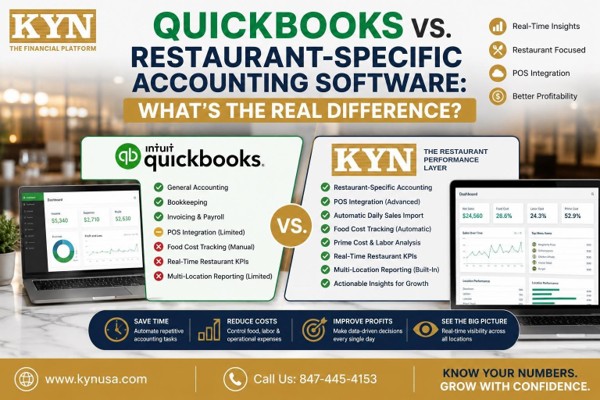
The short answer: QuickBooks handles compliance — the general ledger, payroll and taxes. Restaurant accounting software handles those same books in restaurant-shaped categories, with POS imports and food cost tracking. Neither one shows you how today went. That real-time view is a separate layer, and it is where most restaurant profit is won or lost.
Ask ten restaurant owners what accounting software they run and most will say QuickBooks. It is the default: familiar, affordable, and the system your accountant already knows. The question worth asking is not whether QuickBooks is good software. It is whether general-purpose accounting can keep up with a restaurant.
Because a restaurant is not a typical small business. You buy perishable inventory every week, price it into recipes, sell it through a POS in hundreds of small transactions a day, and pay a crew whose hours move with the weather. By the time a monthly close lands on your desk, the decisions it describes are three to six weeks old.
That gap is expensive. The National Restaurant Association reports that total restaurant expenses have jumped 36% since before the pandemic, and that 42% of operators said their restaurant was not profitable in 2025. At KYN, working from operating data across more than 170 restaurant locations, we see the same pattern constantly: the books are accurate, the accountant is doing good work, and the owner still cannot say whether last week made money.
This guide compares QuickBooks for restaurants with purpose-built restaurant accounting software honestly — what each does well and where each stops — and then names the third category most comparisons leave out.
What QuickBooks Does Well
Start with the fair part, because plenty of successful restaurant groups run QuickBooks and have no reason to stop.
QuickBooks is a mature, well-supported general ledger. It handles invoicing, accounts payable and receivable, bank reconciliation, payroll, and the year-end tax package your CPA needs. It connects to thousands of apps. Nearly every bookkeeper in the United States can work in it on day one, which matters more than operators expect — switching accounting systems means retraining whoever touches your books.
For a single-location restaurant with straightforward reporting needs and an involved accountant, QuickBooks is often genuinely enough. That is not a consolation prize. It is the right answer for a real slice of the market.
Where Generic Accounting Falls Short in a Restaurant
The limits are not bugs. They are the predictable result of software built to serve every industry rather than one.
- The chart of accounts is not restaurant-shaped. Food, beverage, paper and labor need separating the way a restaurant P&L reads, and that is manual setup work someone has to get right.
- Daily sales arrive as a summary. A single journal entry per day tells you the total. It does not tell you which menu items moved, which day-parts carried the week, or where discounts and comps went.
- Prime cost is not calculated. Food and beverage COGS plus total labor is the number that decides whether a restaurant survives, and generic accounting has no concept of it.
- There is no recipe or menu costing. QuickBooks records what you spent on tomatoes. It cannot tell you what a plate costs to make or which items carry the menu.
- Labor lands after the fact. Payroll posts once it has been processed — too late to change a schedule that was already over budget on Tuesday.
- Multi-location comparison takes work. Classes and separate company files can be made to work, but ranking eight stores on labor percentage is a spreadsheet job, every month.
The common thread: the cadence is monthly, and restaurants run daily.
What Restaurant Accounting Software Adds
Restaurant accounting software — sometimes marketed as restaurant bookkeeping software — is the same discipline rebuilt around how kitchens actually operate. Expect POS integration with automatic daily sales imports, food cost tracking against inventory, recipe and plate costing, vendor invoice capture, labor analysis, prime cost reporting, and consolidated multi-location views.
The gain is real. Instead of asking your bookkeeper why food cost moved, the system connects purchases to inventory to sales and shows you. If you want the mechanics in detail, our guide to restaurant prime cost walks through the calculation and the benchmark.
But notice what has and has not changed. The categories got better. The cadence usually did not. Most restaurant-specific platforms still close on a period, and a period close is still a rear-view mirror — a sharper one, pointed the same direction.
QuickBooks vs. Restaurant Accounting Software: Side by Side
Here is the honest comparison, with the third column most articles leave out.
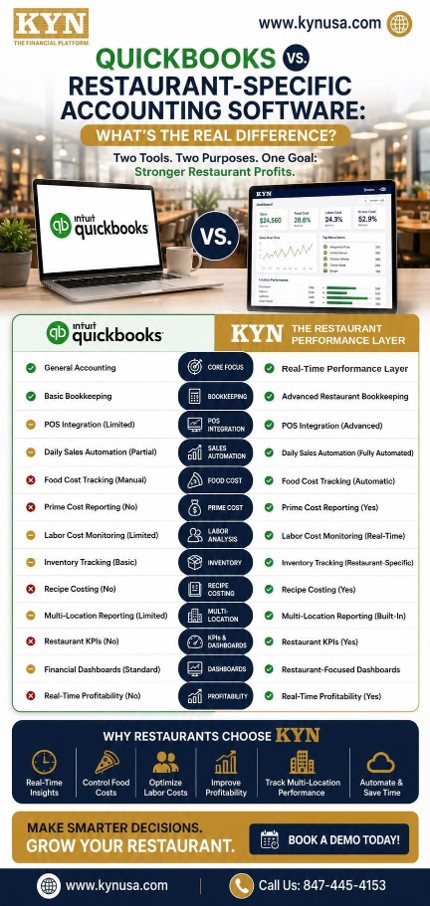
| Capability | QuickBooks | Restaurant accounting software | Performance layer (KYN) |
|---|---|---|---|
|
Core purpose |
Compliance and record-keeping |
Restaurant-shaped record-keeping |
Real-time performance visibility |
|
Chart of accounts |
Generic; manual setup |
Pre-built for food, beverage, labor |
Reads whichever one you already use |
|
POS integration |
Via third-party connectors |
Native daily sales import |
Native: Toast, Square, Clover, Revel, NCR, Micros |
|
Daily sales detail |
Summary journal entry |
Itemized daily import |
Live, by location and day-part |
|
Food cost tracking |
Manual, from invoices |
Automated against inventory |
Automated, with variance alerts |
|
Prime cost |
Not calculated |
Reported at period close |
Tracked daily against the 60% benchmark |
|
Recipe & menu costing |
Not built in |
Yes |
Menu engineering and item profitability |
|
Labor analysis |
Payroll expense after the fact |
Labor % at period end |
Real-time labor % and sales per labor hour |
|
Multi-location |
Classes or separate files |
Consolidated reporting |
Store ranking, rollups, shared-cost allocation |
|
Reporting cadence |
Monthly close |
Weekly to monthly close |
Daily flash report |
|
Replaces your accounting system? |
— |
Usually yes |
Connects with QuickBooks, Xero or NetSuite |
|
Built for |
Any small business |
Restaurants |
Restaurant operators making decisions |
The Third Category: Accounting Records, Performance Decides
Read that last row again, because it is the whole argument.
Both accounting categories answer the same question: what happened? One answers it in general-business language, the other in restaurant language. Both answer it after the fact.
The questions that actually change a restaurant’s profit are different:
- Why did food cost move three points this week?
- Which of my locations is quietly losing money right now?
- Is labor tracking over budget today, while I can still cut a shift?
- Which vendor raised prices without telling me?
Those are performance questions, not accounting questions, and they need answering in hours rather than weeks. That is a separate layer sitting on top of the books — and it is the answer to the oldest complaint in the industry: “my accountant says we’re profitable, so why is there no cash in the bank?”
Does QuickBooks Work for Restaurants? When It Is Genuinely Enough
QuickBooks is very likely enough if you run one location, your reporting needs are straightforward, your inventory is simple, and you have a bookkeeper or accountant who knows restaurants and closes your books promptly. Adding software to that setup buys you complexity, not clarity.
You have outgrown it when two or more of these are true: you run more than one location; you are exporting POS data into a spreadsheet every week; you find out about a bad week after it is over; food or labor cost surprises you at close; or you cannot rank your locations by profitability without building the comparison by hand.
The tell is the spreadsheet. If someone on your team is rebuilding the same weekly workbook every Monday, you are already paying for a performance layer — in labor, with a delay. Our breakdown of what changes when you go from 1 to 10 locations covers where that breaks down first.
Where KYN Fits
KYN handles bookkeeping and daily reporting, and connects with QuickBooks if you already use it. KYN brings your books and your daily numbers into one place — it makes the financial data you already have visible and actionable without replacing your accounting system. Bookkeeping + Performance.
In practice that means your POS, payroll, banking and accounting feed one place, and by the next morning you can see it:
- A Daily Flash Report — net sales, prime cost percentage and cash position, per location, every day.
- A Prime Cost Command Center tracking food, beverage and total labor against the 60%-of-sales benchmark as the period runs, not after it closes.
- A Store Leaderboard ranking every location so the outlier finds you instead of the other way round.
- Menu engineering that shows which items actually carry the margin.
- Automated capture of receipts and vendor invoices, so the data arrives without anyone keying it.
It connects to Toast, Square, Clover, Revel, NCR and Micros on the POS side; QuickBooks, Xero and NetSuite on the accounting side; and ADP, Gusto, Rippling and Paychex for payroll. KYN was built by operators who have managed more than 170 restaurant locations, which is why it reports in the language of a P&L review rather than a trial balance. See the full platform overview or the Prime Cost Dashboard, and if you would rather be walked through it, book a demo.
Common Mistakes When Comparing Restaurant Accounting Software
Switching software when the real problem is cadence
If your numbers arrive three weeks late, a different accounting system will usually deliver the same numbers three weeks late in nicer categories. Fix the reporting rhythm before you migrate a general ledger.
Buying for the features list instead of the decisions
Write down the five decisions you make every week — schedule, order, price, promote, staff — and buy the tool that gets you the numbers for those. Everything else is a demo highlight.
Assuming restaurant-specific means real-time
Many restaurant platforms are still period-close tools. Ask directly: how old is the newest number I will see on a Tuesday morning?
Underestimating the migration
Moving a general ledger means a new chart of accounts, re-mapped history, and a retrained bookkeeper. Layering on top of your existing books avoids that cost entirely — which is often the deciding factor.
Ignoring what your accountant needs
Whatever you choose has to produce a clean year-end package. A performance tool that fights your CPA creates work rather than removing it.
How to Choose: A Practical Checklist
Whether you are evaluating QuickBooks alternatives for restaurants or looking for the best accounting software for restaurants, judge candidates on these:
- Does it integrate natively with your POS — by name, not “via API”?
- How quickly does yesterday’s number appear?
- Does it calculate prime cost automatically, or does someone assemble it?
- Can it consolidate every location without manual work?
- Does it work alongside your accounting system, or demand you replace it?
- Can your accountant get what they need out of it at year end?
- What does implementation cost, in fees and in your team’s hours?
If you want the specific numbers to hold any tool against, start with our guide to the restaurant KPIs every owner should track, and with the foundation piece, What Does “Know Your Numbers” Mean?
FAQs
1 Is QuickBooks good for restaurants?
2 What is restaurant accounting software?
3 Do I need to replace QuickBooks to get restaurant reporting?
4 Why is POS integration important?
5 Which is better for multi-location restaurants?
The Verdict
QuickBooks remains an excellent general accounting platform, and for a well-run single-location restaurant it is often all the accounting you need. Restaurant-specific accounting software organizes the same information in restaurant categories, which helps — particularly with food cost and recipe costing.
Neither one tells you how today went.
The practical answer for most operators is not either-or. Keep your accounting system for compliance. Add a performance layer for decisions. Accounting records the past accurately; performance shows you the present in time to change it. Restaurants run on thin margins and fast cycles, and the operators who protect their profit are the ones who see the number while they can still do something about it.
See your own numbers this way Connect your POS and your books, and get your first Daily Flash Report — net sales, prime cost and cash position, by location — in under a day. No configuration fees. Start your free trial → or book a walkthrough with an operator → |
Know Your Numbers. Grow With Confidence. — kynusa.com · 847-445-4153
Sources
National Restaurant Association, Elevated costs continue to pressure restaurant profitability — total restaurant expenses up 36% since 2019; 42% of operators reported their restaurant was not profitable in 2025.
restaurant.org/research-and-media/research/restaurant-economic-insights/
KYN internal operating benchmarks, drawn from financial data across 170+ restaurant locations — prime cost benchmark at or below 60% of sales.